3Win8 download: checking your version, installing cleanly and keeping fish games smooth
3Win8 came for Android, iPhone and Windows. How to get the current build, read the version number in the lobby, and stop the fish tables from stuttering.
Cartridge label
- Old builds (2018 page)
- Android APK, Windows PC, iPhone iOS
- Lobby sections
- Online Games, Entertainment City, 777, Hot Games
- Version label
- Bottom right of the lobby
- Files hosted here
- None
The old 3Win8 page listed the Android APK first, then a Windows installer, with the iPhone build last. All three files have been taken down here, and this page explains what replaces them.
3Win8 is a separate platform from 918Kiss with its own IDs. The lobby opens on four big panels: Online Games, Entertainment City (roulette and table games), 777 (the slot room, shown as a "Lucky Slot" machine) and Hot Games. A gold JACKPOT counter runs above them, a gear icon sits top right, and a "Champion Today" strip along the bottom shows the day's top players.
Why 3Win8 files are not on this site
Installers age badly. 3Win8 updates its client, the old file stops logging in, and people keep downloading it from old pages anyway. Add the risk of a modified APK and it is simply not worth hosting one.
Get a 3Win8 ID together with the current download link from your account provider. The link they send is the version the server expects today.
Check the version number first
Small detail, saves a lot of messages: the 3Win8 lobby prints its build number at the bottom right in tiny text, something like "VERSION 5.1.1". When a login fails, read that number and pass it on to your provider. It tells them straight away whether you are on an outdated build.
Installing 3Win8
Android. Uninstall the old app. Open the new link in the phone browser and allow it to install apps for this one time. Install, then revoke that permission.
iPhone. Open the link in Safari, then trust the developer profile in Settings > General > VPN & Device Management before launching.
Windows. If your provider still has a PC client, install it from their link only and let Windows Defender scan it. Do not switch off antivirus to make any installer run.
Keeping the 3Win8 fish tables smooth
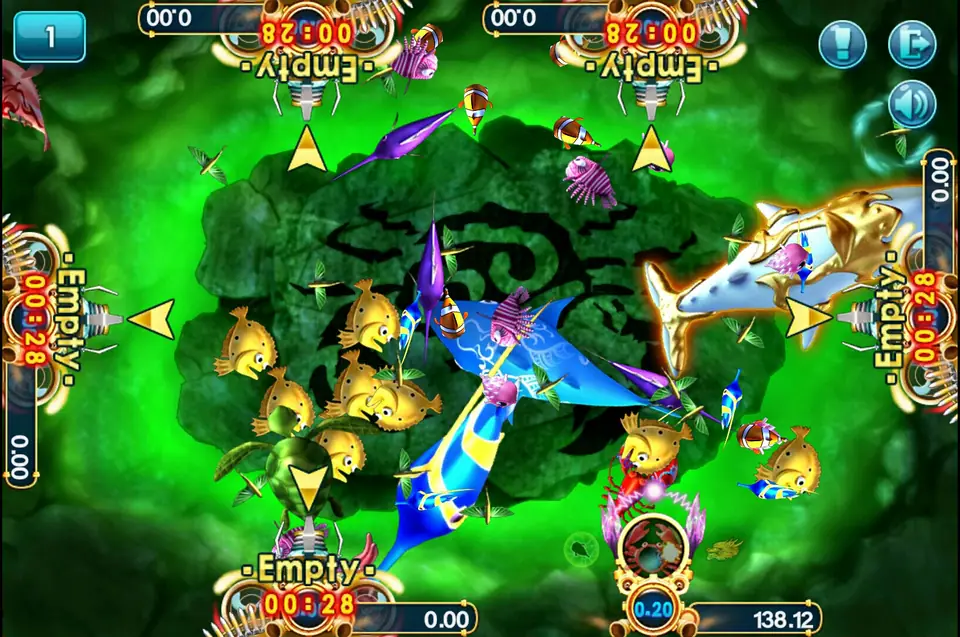
The fish shooting room is the heaviest thing in the app. The table above has four cannon seats (unused ones read "Empty" with a countdown), the stake per shot in the small box by your cannon, and the balance beside it. Everything moves at once, so a weak phone or weak signal shows up here first.
- Close other apps before opening a fish table.
- Wi-Fi beats mobile data for this room; switch if the fish jump or freeze.
- On PC, the Windows client handles it better than an old phone.
- The sound toggle top right cuts a little load on older handsets.
Other 3Win8 errors
- "App not installed": an old copy is still there, possibly under a slightly different name. Search the app list for 3Win8 and remove every one.
- Frozen on the jackpot screen: the app is waiting for the server. Force-close and reopen.
- Balance missing after switching phone: log out on the old phone first, then in on the new one.
What each of the four panels contains is in the 3Win8 overview. Game pages worth a look once you are set up: Iceland on 3Win8 and Highway Kings.
Troubleshooting and questions
How do I know if my 3Win8 app is the latest?
The lobby prints its version in small text at the bottom right (an old capture shows VERSION 5.1.1). Compare it with what your provider says is current. If the server has moved on, it will usually refuse your login anyway.
Can I use one 3Win8 ID on my phone and my PC?
Normally yes, the ID lives on the server. Just do not stay logged in on both at once; most platforms kick the older session.
Press start
Want to play it yourself? Get a game ID through our partner link, then set a spending limit before the first round.