Live22 download: four old builds, per-game downloads and storage space
Live22 was the only app here with a Mac build as well as iPhone, Android and Windows. The app itself is small; each game downloads on first tap. What that means for installs.
Cartridge label
- Old builds (2018 page)
- iPhone iOS, Android, Windows, Mac
- Games
- Downloaded one by one inside the app
- Balance shown in
- MYR
- Files hosted here
- None
Controls
- Profile icon (top left)
- Account details
- Megaphone
- Platform announcements
- Menu bars (top right)
- Settings and other options
- TAP TO DOWNLOAD
- Fetches that game's files before first play
Live22 stood out on the old download page for one reason: it was the only platform with a Mac build, alongside the usual iPhone, Android and Windows files. None of the four are hosted here any more. What follows is how to get a current copy and what to expect once it is on the phone.
How the Live22 app is put together
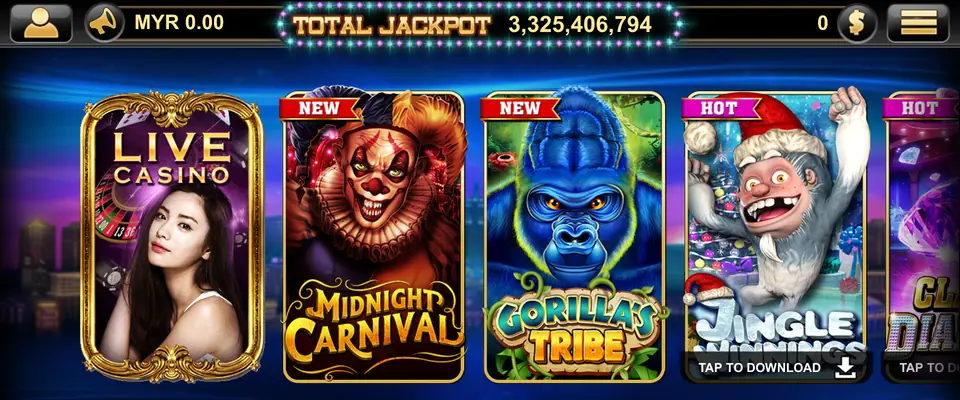
The first thing people notice after installing Live22 is how little is in it. The app is mainly the lobby. A slot tile such as Jingle Winnings carries a grey TAP TO DOWNLOAD strip until you tap it; the game's files then download, and after that it opens like any other.
Across the top of the lobby: a profile icon, a megaphone for announcements, your balance in MYR, a large TOTAL JACKPOT counter, a coin counter and a menu button. Tiles are tagged NEW (Midnight Carnival and Gorilla's Tribe in this capture) or HOT, with a separate LIVE CASINO tile at the far left.
That design has two practical effects. First, you need free storage for every game you add, not just for the app. Second, the first tap on each game uses mobile data, so do your downloading on Wi-Fi.
Getting the current Live22 build
Old Live22 installers do not survive server updates, and files floating around old mirrors are not worth the risk to your phone. Get a Live22 game ID and the app link that goes with it from your account provider, and tell them which device you are on: phone, Windows or Mac.
Install notes by device
Android: remove any old Live22 app. Allow the browser to install unknown apps just for this file, install, then take the permission away again.
iPhone: open the link in Safari, then trust the new developer profile under Settings > General > VPN & Device Management.
Windows and Mac: use only the installer from your provider's link. macOS may block it as coming from an unidentified developer. Do not change your Mac's general security settings to get around that; if the source is right, you can allow that one app through Privacy & Security.
Live22 problems and what causes them
- Game download stops at a percentage: usually storage. Clear space and tap the tile again.
- Downloaded game crashes on open: delete the app, reinstall from a fresh link, and re-download the game. The game files and the lobby have to be on matching versions.
- Live Casino tile does nothing: live tables stream video; they need a steadier connection than slots.
- Jackpot counter frozen: the lobby lost its connection. Pull it to the background and back, or restart.
Slot pages for this platform start at the Live22 overview, with Buffalo Blaze and Spirit Bear as two examples from the catalogue.
Troubleshooting and questions
Why does every Live22 game ask me to download it?
The app only carries the lobby. Each game fetches its own files the first time you tap it, which keeps the install small but uses data and storage as you add games.
Is the Live22 Mac version still around?
The 2018 page listed a Mac .pkg file. Whether one is offered now is up to your provider, so ask when you request the link.
Press start
Want to play it yourself? Get a game ID through our partner link, then set a spending limit before the first round.