SKY777 download: a phone-only app, how to install it and what the first screen shows
SKY777 was always a phone app, one iPhone build and one Android APK. How to get a current copy, install it without leftovers and recognise a working lobby.

Cartridge label
- Old builds (2018 page)
- iPhone iOS, Android APK
- PC client listed
- None
- Lobby tabs
- All, Feature, Progressive, Slot, Arcade, Table, Live Casino
- Files hosted here
- None
Controls
- Speaker icon
- Turns game sound on or off
- Envelope icon
- Opens messages from the platform
- Gear icon
- Settings
SKY777 only ever shipped for phones. The old version of this page had exactly two buttons, iPhone and Android, with no PC client and no separate 32-bit build. That keeps things simple: one link, one app, one game ID.
The files themselves are gone from scr888.men. A SKY777 APK that sat on a download page for years would now fail the version check on login, and there is no way for us to prove an old file has not been tampered with.
Getting a working SKY777 app
The link that matters is the one that comes with your account. Ask for a SKY777 game ID and the current app link and install from that, on the phone you intend to play on.
Android
Delete any older SKY777 icon first. Open the new link in the browser, allow that browser to install apps when Android asks, install, then switch the permission back off in Settings > Apps > Special app access.
iPhone
Use Safari. The first tap on the icon will say the developer is not trusted. In Settings > General > VPN & Device Management, open the profile that appeared with SKY777 and tap Trust.
What a working SKY777 lobby looks like
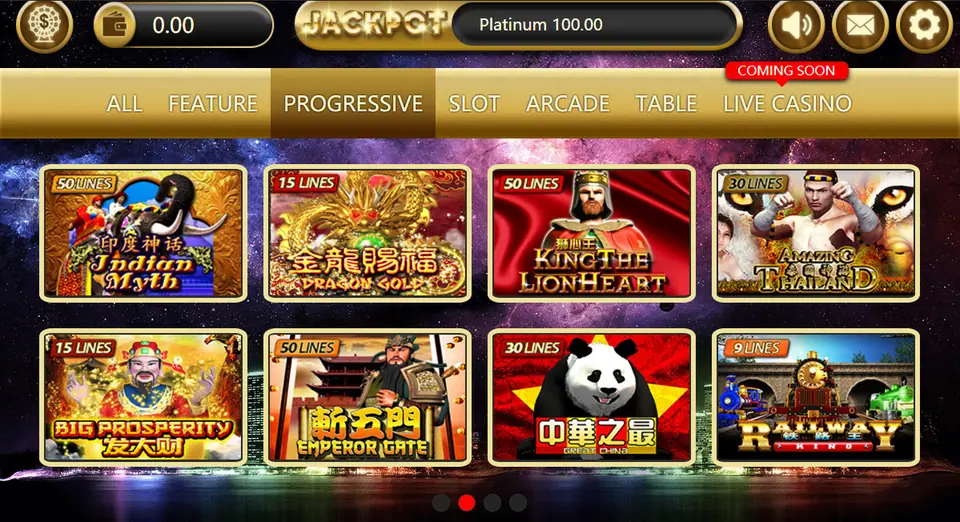
Log in and you should land on a dark lobby with a gold bar across the top. Left to right: a round menu button, your wallet showing the balance, a JACKPOT bar with a Platinum figure, then speaker, envelope and gear icons.
Below it, the category tabs: ALL, FEATURE, PROGRESSIVE, SLOT, ARCADE, TABLE and LIVE CASINO. In this capture Live Casino carries a red "Coming Soon" tag.
Each game tile shows its line count in the top-left corner, which is handy when you are choosing. On the Progressive tab here: Indian Myth and King the Lionheart at 50 lines, Big Prosperity and Dragon Gold at 15, Amazing Thailand at 30, Railway King at 9. Dots under the grid mean there are more pages; swipe sideways.
If your balance reads 0.00 and the tiles are all there, the app is fine and the account simply has no credit on it.
SKY777 install problems
Download finishes but nothing installs. On Android the file may have landed in Downloads without opening. Tap it from the notification or a file manager.
Lobby loads, games will not open. Each game downloads its own resources the first time. On slow data this can take a while. Wait on the loading bar rather than backing out, which restarts it.
Login works on one phone, not another. Check the second phone has the same version. Two builds on two phones is a common mix-up.
Icon disappeared on iPhone. The certificate was revoked. Remove the app and install from a new link.
Game-by-game notes start from the SKY777 overview. Two tiles from that lobby with their own pages: Emperor Gate and Wong Po.
Troubleshooting and questions
Can I play SKY777 on a computer?
The 2018 page offered no Windows or Mac file, only iPhone and Android. If you want to play on a larger screen, a tablet running the phone app is the usual workaround.
The Live Casino tab says Coming Soon. Is my app out of date?
Not necessarily. The screenshot here shows that label too. Whether live tables have opened since depends on the current build, so ask your provider when you get the link.
Press start
Want to play it yourself? Get a game ID through our partner link, then set a spending limit before the first round.