Mega888 download: builds, the loading screen and your first look at the lobby
Mega888 shipped the same three builds as 918Kiss. How to get today's version, what the loading bar and lobby should look like, and where to check your bet history.
Cartridge label
- Old builds (2018 page)
- iOS 64-bit, iOS 32-bit, Android APK
- Lobby buttons (bottom)
- Menu, History, Suggestion
- Side tab
- Game Directory
- Files hosted here
- None
Controls
- MENU
- Opens the app menu
- HISTORY
- Shows your past rounds and results
- SUGGESTION
- Sends feedback to the platform
- GAME DIRECTORY
- Side tab that lists games by category
Mega888 is the other big app-based lobby in Malaysia after 918Kiss, and the old download page treated it the same way: three buttons for iOS 64-bit, iOS 32-bit and Android APK. The 64-bit build covered iPhone 5s and later plus iPad Air and iPad mini 2 onwards; the 32-bit one was for the iPhone 5 and earlier.
Those three files have been removed, and the 32-bit build would be pointless now anyway. Since iOS 11, iPhones do not run 32-bit apps at all.
Getting Mega888 today
The only link worth installing is one that comes with your own account. Ask for a Mega888 game ID and the current app link, and install from what you receive. Old APKs that still circulate on forums will generally be refused by the login server, and you have no way of knowing who repacked them.
Android: delete any older Mega888 app, open the link, allow the browser to install it this once, then turn that permission off.
iPhone: open the link in Safari, then go to Settings > General > VPN & Device Management and trust the Mega888 developer profile before tapping the icon.
The Mega888 loading screen
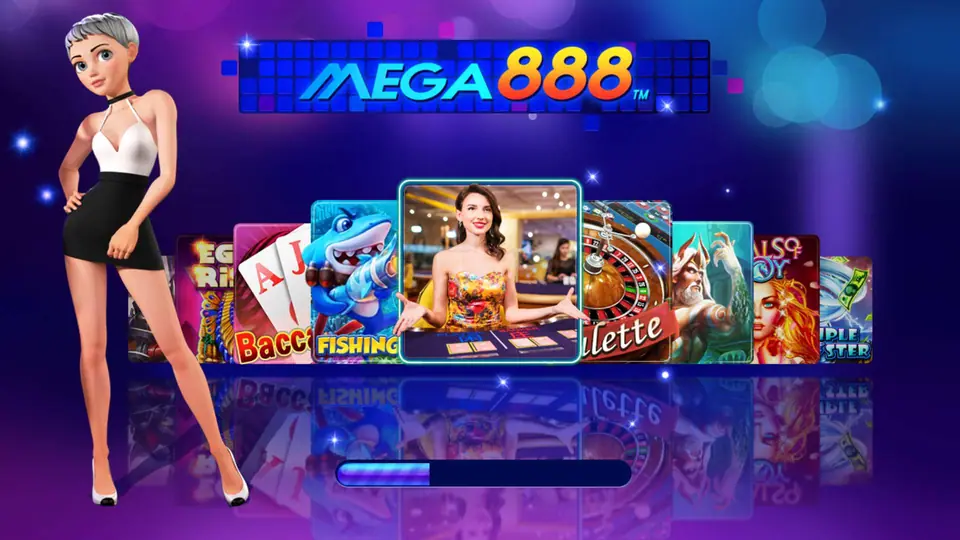
A fresh install opens on the screen at the top of this page: the blue Mega888 logo, a cartoon hostess on the left, and a carousel of game panels (Baccarat, Fishing, a live dealer table, Roulette) sliding behind them. The thin bar at the bottom is the real indicator. It fills as the app checks its version and loads resources.
If the bar fills and you land on the login box, the install is good.
First look at the Mega888 lobby
After login, the lobby has a coin balance top left, the Mega888 logo in the middle and your account ID top right, with a list icon and an exit icon beside it. A Game Directory tab runs down the left edge.
Tiles in the old capture included Poker Three, Ocean King, Da Sheng Nao Hai, Li Kui Pi Yu, Motorbike, Robin Hood Shifting Riches, Alice and African Wildlife. Some tiles show a running jackpot figure underneath.
The bottom bar has MENU, HISTORY and SUGGESTION, and a gold Special Bonus jackpot machine sits in the bottom-right corner. HISTORY is the one to know: it is where you check a disputed round.
Mega888 login and update faults
- "Version expired" on launch: delete and reinstall from a new link. The ID and balance stay on the server.
- Login box rejects a correct password: check for an auto-capitalised first letter, which phone keyboards love to add.
- iPhone app vanished or will not open: certificate revoked. You need a fresh link, nothing else will fix it.
- Android "App not installed": an older Mega888 copy is still on the phone.
For the games themselves, start from the Mega888 overview. The 918Kiss download page covers the sister app, and Robin Hood Shifting Riches is one of the lobby tiles described above.
Troubleshooting and questions
Does a 918Kiss ID work in Mega888?
No. They are separate platforms with separate accounts, even though the download page listed the same three builds for both.
The Mega888 loading bar stops halfway. What now?
The app is waiting on the server or downloading updates. Switch to Wi-Fi and give it a minute before force-closing. If it happens every time, the build is probably outdated.
Press start
Want to play it yourself? Get a game ID through our partner link, then set a spending limit before the first round.